
Here’s the thing: I can’t sit still for three hours.
A friend sent me this Andrew Huberman podcast last weekend. “You’ll love this,” they said. And they were probably right. But three hours? I tried. Really tried. Made it about 20 minutes before I started cleaning my desk. Then checking email. Then I lost track completely.
Sound familiar?
The Real Problem
Let’s talk about what’s actually happening here. Long-form content is everywhere now. Podcasts routinely run 2-3 hours. The content is often incredible. Deep conversations, real insights, the kind of stuff that changes how you think.
But the format? It’s broken for people like me.
Think about it:
- You can’t skim a podcast
- You can’t highlight the good parts
- You can’t read it at 2am when you can’t sleep
- You definitely can’t read it on your Kindle at the beach
I kept thinking: what if I could just… read it?
Building My Way Out
So I did what any reasonable programmer would do. I spent a weekend building a tool instead of just listening to the podcast.
I call it video-to-transcript. Here’s what it does:
-
Takes any YouTube URL
-
Downloads the video (thanks, yt-dlp)
-
Extracts just the audio (ffmpeg)
-
Sends it to Deepgram for transcription
-
Figures out who’s actually speaking (not just “Speaker 0”)
-
Generates a beautiful EPUB for your e-reader (pandoc)
One command. That’s it. Just run this with any YouTube URL and wait a few minutes.
The Magic Parts
Let me share the bits that made me smile while building this.
**It’s smart about caching. **Download a 3-hour video once, and it never downloads again. Already transcribed something? It remembers. This matters when you’re tweaking the output format for the fifteenth time at 1am.
// Smart caching in video-to-transcript
// From: https://github.com/camwest/video-to-transcript/blob/main/src/transcriber.ts#L46-L52

const responseFile = audioPath.replace(/\.[^.]+$/, '.deepgram.json');

if (!force && existsSync(responseFile)) {
  console.log(`✓ Using existing transcription: ${responseFile}`);
  try {
    const responseText = readFileSync(responseFile, 'utf8');
    const result = JSON.parse(responseText);
It actually knows who’s talking. Deepgram tells you someone is speaking, but not who. So I added a bit of AI magic. The tool reads the video description and figures out “Oh, Speaker 0 is Andrew, Speaker 1 is Lori.” Simple, but it transforms the reading experience.
// Speaker identification prompt from video-to-transcript
// From: https://github.com/camwest/video-to-transcript/blob/main/src/speaker-identifier.ts#L35-L55

return `You are an expert at identifying speakers in YouTube video content. Extract FIRST NAMES ONLY from video metadata and transcript introductions.

Identify speakers by FIRST NAME ONLY for this YouTube video:

Video Title: "${metadata.title}"
Channel: "${metadata.uploader}"
Description: "${metadata.description.substring(0, 500)}..."
Transcript Start: "${transcriptSnippet}"

Detected ${speakerCount} speakers in the transcript.

IMPORTANT: Return an array where the ORDER MATTERS:
- Index 0 should be Speaker 0's first name (typically the host/channel owner)
- Index 1 should be Speaker 1's first name (typically the guest)
- And so on for additional speakers

Example: If Speaker 0 is "Andrew" and Speaker 1 is "Lori", return ["Andrew", "Lori"]

Return ONLY first names. Be confident only if names are clearly mentioned in the content.
If you cannot identify names with confidence, return an empty array.`;
}
Everything has predictable names. No random file soup. Everything is named after the video ID. You always know where things are.
// Deterministic file naming in video-to-transcript
// From: https://github.com/camwest/video-to-transcript/blob/main/src/workspace.ts

/**
 * Extract a safe directory name from a YouTube URL or file path
 */
function extractProjectId(input: string): string {
  // Try to extract YouTube video ID
  const videoIdMatch = input.match(/(?:v=|\/)([\w-]{11})(?:\?|&|$)/);
  if (videoIdMatch) {
    return videoIdMatch[1];
  }

  // For local files, use the filename without extension
  const pathParts = input.split(/[/\\]/);
  const filename = pathParts[pathParts.length - 1];
  const nameWithoutExt = filename.replace(/\.[^.]+$/, '');

  // Sanitize the filename to be filesystem-safe
  return nameWithoutExt.replace(/[^a-zA-Z0-9-_]/g, '-').toLowerCase();
}
What It Actually Looks Like
That 3-hour Huberman podcast? It’s now a 50,000-word book on my Kindle.
The transcript reads like this:
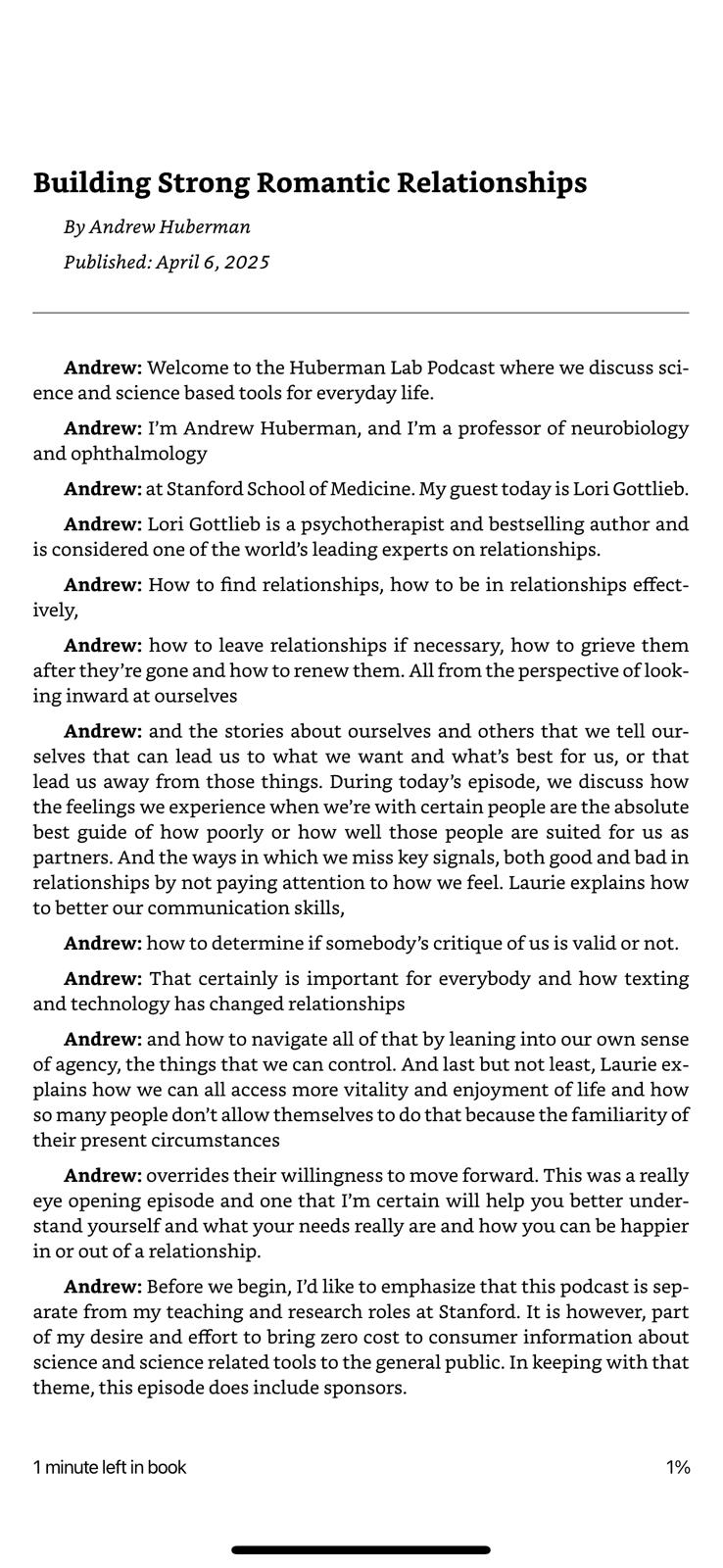
Clean. Readable. Perfect for highlighting.
Now I can:
- Read at lunch
- Highlight the interesting parts
- Jump around between topics
- Actually finish the thing
What’s Next?
The tool works great for my use case. But I keep thinking about what else it could do:
Could it detect chapter breaks automatically? What about podcasts with three or four speakers? Integration with Readwise or Kindle highlights?
For now though, I’m happy. I’ve got a stack of three-hour podcasts waiting for me. Except now they’re books.
Sometimes the best interface for consuming information is still just plain text. Who knew?
Now if you’ll excuse me, I have a 3-hour podcast to read. Finally.